
Step 1: Apply to Write
Visit the “Write for Us” page
- Go to
/write-for-uson the Eureka News website - Read about what we’re looking for and the benefits of writing for us
Sign in with Twitter
- Click “Apply to Write”
- You’ll be redirected to sign in with your Twitter account
- Important: Writers must use Twitter authentication (email/password is for admins only)
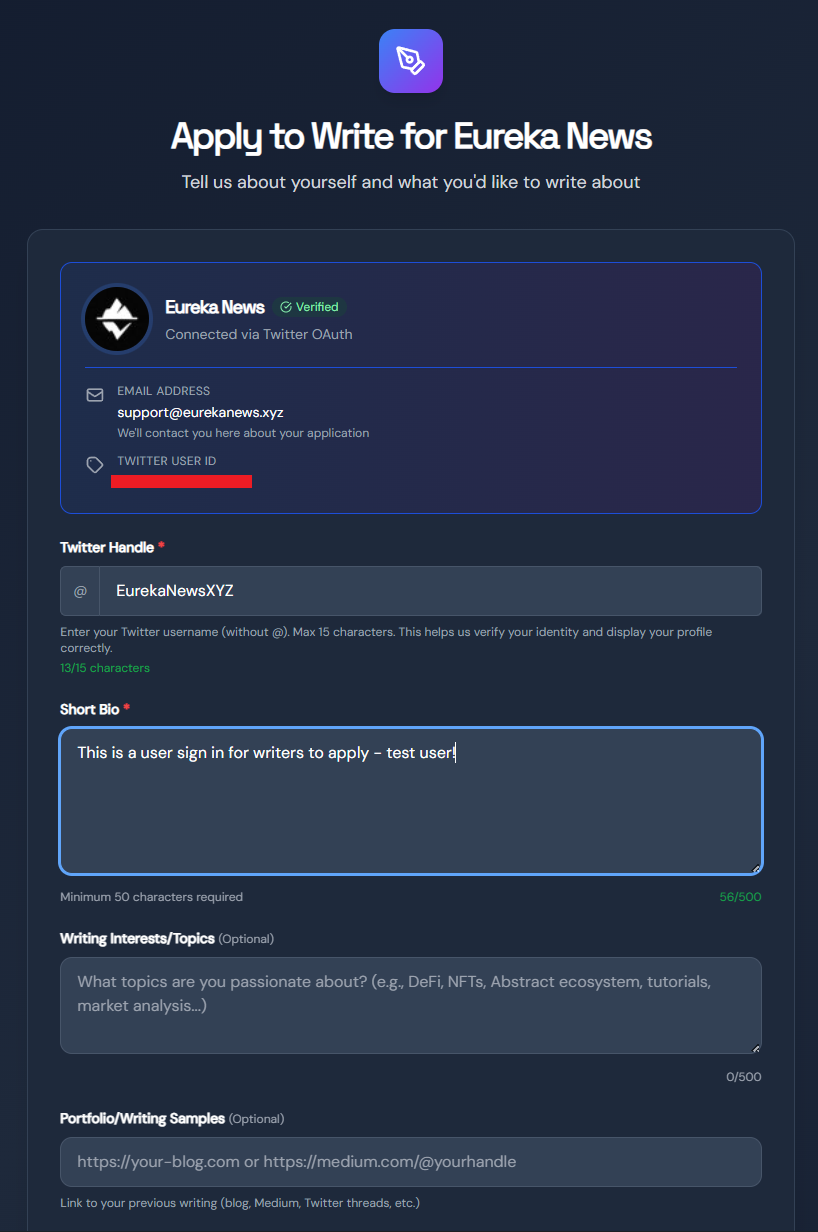
Complete Your Application
Fill out the application form with:- Bio (50-500 characters): Tell us about yourself and your writing experience
- Interests (optional, 500 characters max): What topics are you passionate about?
- **Request Tags: **Request relevant tags for what you want to write about
- Portfolio (optional): Link to your writing samples or portfolio
Wait for Approval
- Your application will be reviewed by our editorial team
- You’ll receive an email notification when your application is approved or rejected
- Check your application status in your admin dashboard
Step 2: Set Up Your Profile
Once approved, customize your writer profile:Navigate to Profile
- Go to
/admin/profilein the admin dashboard - Click “Edit Profile”
Complete Your Profile
- Display Name: How your name appears on articles
- Bio: Your writer bio (appears on your author page)
- Profile Image: Upload a professional headshot
- Homepage: Link to your personal website or portfolio
- Twitter Handle: Already verified from your application
Request Tag Access
- Click “Browse Tags” to see available topics
- Request access to tags you want to write about
- Editors will review and approve your tag requests
- You can only write articles using tags you’ve been assigned
Your Role as a Writer
You’re building a comprehensive resource for Abstract projects. Every article you write moves content from siloed platforms (Discord, Twitter, Telegram) onto permanent pages that:- Can be discovered by people searching for information
- Persist beyond the 24-hour lifecycle of social media posts
- Get syndicated across the web via RSS feeds
- Build a lasting archive of Abstract ecosystem knowledge
What You Can Do
- Create and edit your own articles
- Submit articles for editorial review
- Request access to new tags/topics
- View your published articles and stats
- Manage your profile
- Contribute to Abstract ecosystem knowledge - Your content becomes a permanent resource
What You Cannot Do
- Publish articles directly (must go through review)
- Edit articles after they’re published
- Use tags you haven’t been assigned
- Access other writers’ drafts
Article States
Articles go through these states:- Draft: Your work-in-progress article (you can edit freely)
- Submitted: Article submitted for review (you can still edit by clicking “Save Draft”)
- In Review: Editor is reviewing your article (you can still edit by clicking “Save Draft”)
- Needs Revision: Editor requested changes (you can edit and resubmit)
- Published: Article is live on the website (read-only)
- Rejected: Article was rejected (e.g. against content policy)
Published articles cannot be edited or unpublished by writers. Contact an editor if you need changes.
Next Steps
Your First Article
Create and format your first article.
Tag System
Understand how tags work and request access.